Three Ways to Work With WebGuy IT
Every business runs its technology a little differently, so we offer three ways to work with us: Break/Fix, Pre-Paid Support, and our fully Managed Services Agreement (MSA). They differ mainly in three things — how predictable your costs are, how much we handle proactively, and how much of a monthly commitment you make.
There's no single "best" option; the right fit depends on how your business uses IT. If you'd like a quick recommendation and current pricing tailored to your size and needs, our Tier Chooser will walk you through it in a couple of minutes. The summaries below explain what each tier is, who it tends to suit, and how billing works — so you can go into that conversation already knowing the landscape.
Find Your TierExplore Each Tier
Select a tier below to read the full details — billing, who it suits, what's included, and how it compares.
The idea: Pay only when you actually use us. No monthly commitment.
Break/Fix is support on demand. When something goes wrong — or you need a hand with a project — you call, we help, and you're billed for the time we spend. It's the simplest arrangement we offer and a comfortable starting point if your setup is small or stable.
Who it tends to suit
- Businesses with simple, reliable systems that rarely need attention
- Anyone who wants IT help available without a recurring bill
- Clients who prefer to pay strictly for what they use
How billing works
- Billed at $150/hour, in 30-minute minimum increments
- No monthly fee and no contract term — you only pay when you call
- Emergency and after-hours work is billed at a different rate, which we'll spell out in your quote so there are no surprises
Good to know
Because Break/Fix is reactive, it doesn't include the round-the-clock monitoring, bundled security, or guaranteed response times that come with our other tiers. If a major issue strikes, the cost depends on how much time it takes to resolve. For many small or steady environments that trade-off is exactly right — and if your needs grow, moving up to Pre-Paid or an MSA is easy.
Not sure if this fits? The Tier Chooser can help you compare.
The idea: Reserve a set number of support hours each month at a discounted hourly rate.
Pre-Paid Support sits between calling as-needed and full management. You pay a fixed monthly amount for a block of support hours, billed at a lower rate than Break/Fix. It gives you a predictable monthly cost, a standing relationship with our team, and priority that comes from being a committed client — without stepping all the way up to a fully managed agreement.
Who it tends to suit
- Businesses with a steady, predictable amount of monthly IT work
- Clients who want a discount on their hourly rate and a reliable monthly budget
- Anyone who wants an ongoing relationship with us but not full management
How it works
- A fixed monthly fee covers a set Monthly Allotment of hours at a discounted rate
- Choose a 6-month or 12-month term; the 12-month term locks your rate for the year
- Your hours are tracked as a single running balance that carries from month to month
- Pricing is tailored to your needs — see the Tier Chooser
How the Quarterly Cap Works
We believe in being upfront about billing, so here's exactly how your hours are kept fair and current. Think of your account as a single running balance of hours that carries forward each month:
Balance & Cap — Plain Language
If we've done more work than you've paid for, the balance is positive (hours are owed to us). If you've paid for more hours than you've used, the balance is negative (hours are owed to you).
Every three months — at the end of each calendar quarter — we true up that balance against a cap equal to one quarter's worth of your hours (three times your monthly allotment). The cap works in both directions:
- Positive balance at the cap: We invoice the work already performed and reset the balance to zero. You start fresh the next month.
- Negative balance at the cap: You keep up to one quarter's worth of unused hours. Any unused hours beyond that cap are forfeited (this prevents unused time from piling up indefinitely with no benefit to either side). We'll do our best to reach out before that point so we can put your hours to good use.
- Balance in between: Nothing happens — it just carries forward.
At renewal, any positive balance is invoiced and reset to zero, while any unused (negative) balance carries over to your new term — nothing is lost at renewal.
The chart below shows how this plays out over a year for an example client with six support hours per month (a cap of eighteen hours):
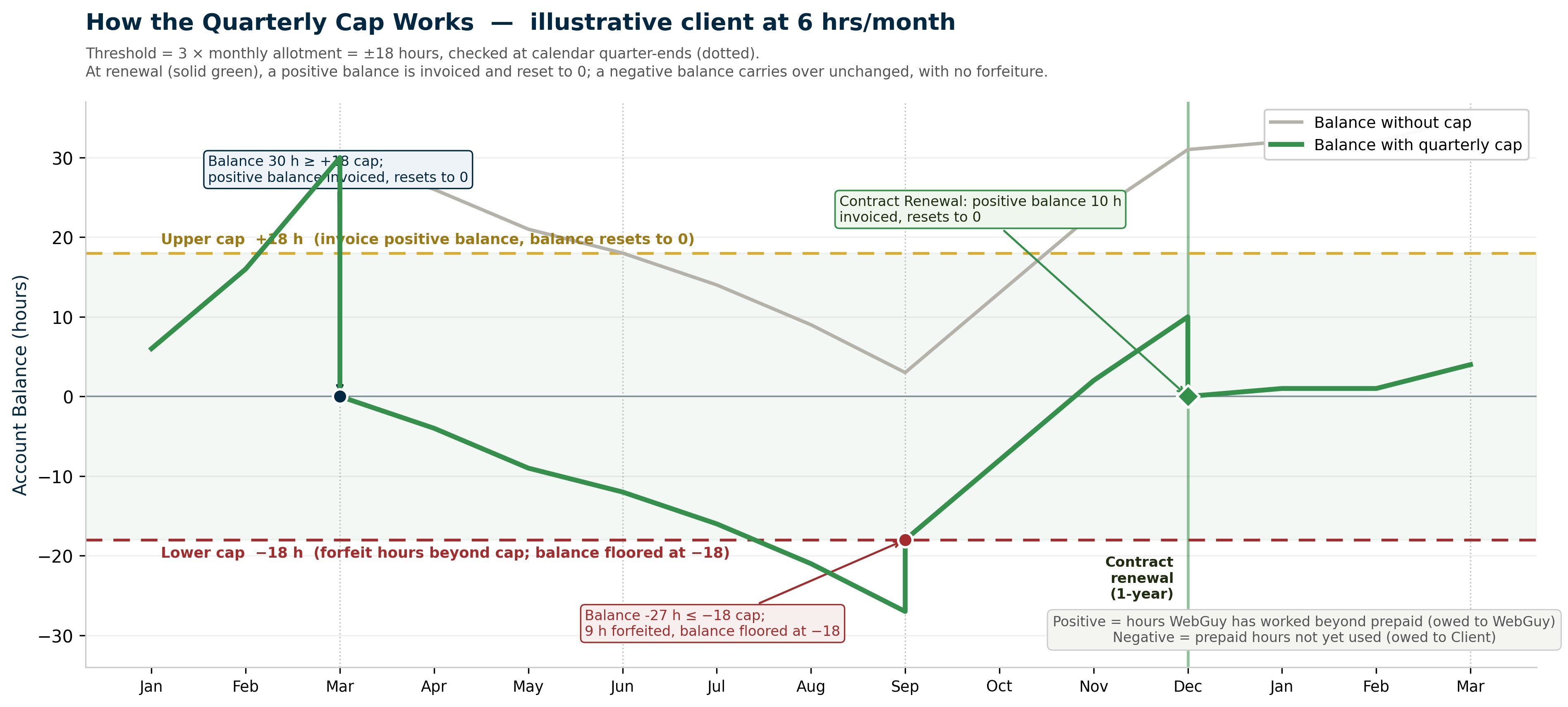
How the Quarterly Cap works — an illustrative client with 6 support hours per month.
The balance rises and falls month to month; at each quarter-end it is checked against
the +18 / −18 caps, and at renewal a positive balance is invoiced and reset
while a negative balance carries over.
This example is for illustration. Your allotment and cap are based on your own agreement.
Want pricing or help sizing your hours? Start with the Tier Chooser.
The idea: A flat monthly fee, and we handle your technology for you — proactively.
Our Managed Services Agreement is the fullest way to work with us. Instead of buying hours, you get a managed relationship: we monitor your systems around the clock, keep them patched and protected, back them up, report on them, and help you plan ahead. It turns IT from something you react to into something that's quietly handled in the background.
Who it tends to suit
- Businesses that want their technology managed, not just repaired
- Teams that depend on their systems running and want fewer surprises
- Clients who value predictable monthly costs and a long-term technology partner
What's included
- Unlimited remote support from a technician during business hours, plus unlimited automated remediation (scripted fixes that run without a technician, any time of day)
- 24/7 monitoring, maintenance, and patching of your PCs and servers
- Endpoint protection and managed threat detection (antivirus and EDR) included
- Backup and disaster recovery through For Safety Sake, a WebGuy company
- Cloud file sync and share
- Quarterly reporting on tickets, patching, security, and reliability
- A Virtual CIO — quarterly planning meetings to budget and map your technology roadmap
Response times you can count on
Unlike the as-needed tiers, an MSA comes with defined response-time targets by priority — for example, a server-down emergency gets a remote response within an hour during business hours. If we miss a target on a high-priority issue, you're eligible for a service credit on your bill. It's our commitment to the service level in writing.
How pricing works
An MSA is a flat monthly fee built from your device and user count plus the software licensing you need (such as Microsoft 365 and security tools). Because it's tailored to your environment, the Tier Chooser is the best way to see pricing for your business.
Projects outside day-to-day support are quoted separately, and MSA clients receive a preferred project rate.
Ready to see what this costs for your team? Use the Tier Chooser.
At a Glance
A side-by-side look at how the three tiers compare across the things that matter most.
| Break/Fix | Pre-Paid Support | Managed Services (MSA) | |
|---|---|---|---|
| Billing model | Hourly, as used | Monthly fee for a block of hours | Flat monthly fee |
| Monthly commitment | None | 6- or 12-month term | 6-month term, auto-renewing |
| Hourly rate | $150/hr, 30-min minimum | Discounted vs. Break/Fix | Included (preferred rate on projects) |
| Proactive monitoring | — | — | 24/7 |
| Security included | — | — | Antivirus + EDR |
| Backup & disaster recovery | — | — | |
| Response-time guarantee | — | — | With service credits |
| Virtual CIO / planning | — | — | Quarterly |
| Best for | Simple, stable setups | Steady, predictable needs | "Just handle it" — fully managed |
| * Emergency and after-hours work is billed at a different rate across all tiers; details are provided in your quote. | |||
Not Sure Which Fits?
That's what the Tier Chooser is for. Answer a few quick questions about your business and we'll point you to the option that fits best — along with pricing built for your size and needs.
Find Your Tier